
Removing elements: remove, clear, removeWhere
on Monday, 20th of July, 2020
Again, these methods are all methods on lists, some of which will also exist on iteratbles, sets, and other collections. For the sake of simplicity, though, it's best to focus on lists.
The follow methods are used frequently to remove elements from lists:
clear- removes every element from the list, but retains the list itself and it's type cast.
remove(element)- removes a single element from the list, which is strictly equal to the element passed in.
removeWhere(callback)- removes every element in the list that satisfies the test, which is passed in as a callback.
There are also other methods -- removeAt, removeLast, and removeRange, that behave similarly to remove.
Of these, clear is pretty straight-forward, while the other two contain important notes. So, we'll start with a quick example of clear.
void main() {
  List favoriteYears = [1990, 2002, 2011];
  print(favoriteYears); // [1990, 2002, 2011]
  favoriteYears.clear();
  print(favoriteYears);
  print(favoriteYears.runtimeType);
}
remove and removeWhere
If we continue to use an example like above, then remove is pretty straight forward.
void main() {
  List<int> favoriteYears = [1990, 2002, 2011];
  print(favoriteYears);
  favoriteYears.remove(2002);
  print(favoriteYears);
}
This example does what you'd expect. The second time the list is printed, after remove is called once, the list will read [1990, 2011].
But, the example gets a little more complicated when you you're working with objects that aren't primitives. Let's take a look at the following example:
class Pet {
  Pet(this.name, this.animalType);
  String name;
  String animalType;
}
class AnimalDaycare {
  AnimalDaycare(this.allPets, this.petsToFeed);
  final List<Pet> allPets;
  final List<Pet> petsToFeed;
  void addPet(Pet pet, bool shouldFeed) {
    allPets.add(pet);
    if (shouldFeed) petsToFeed.add(pet);
  }
  void feedPet(String petName, {String petType = "cat"}) {
    final newPet = Pet(petName, petType);
    // pet.feed
    petsToFeed.remove(newPet);
  }
}
void main() {
  var phoebe = Pet('Phoebe', 'cat');
  var wallace = Pet('Wallace', 'cat');
  var pepper = Pet('Pepper', 'dog');
  var animalDaycare = AnimalDaycare()
                  ..addPet(phoebe, true)
                  ..addPet(wallace, true)
                  ..addPet(pepper, false);
}
/// in the ui, a user selects which pet to feed based on a list of pets.
/// but, the list of pets contains names only, so it doesn't bloat the
/// data layer of the front end
// ..
void _onPetSelectedFromList(String petName, AnimalDaycare daycare) {
  daycare.feedPet(petName);
}
What's going to happen when _onPetSelectedFromList is called? nothing. (at least, nothing noticeable to the user or developer). This is because remove only works on objects that are strictly equal. So even though remove is being called on a pet that has the same attributes, it's a different instance of the class.
In complex apps with lots of data, this is actually a common occasion. It usually occurs when: 1. You use immutable classes as much as possible. 2. Your UI is completely separate from your business logic.
These are both 'best practices' in app building, so you'll likely run into this problem.
Don't take my word for it, though, this is why Dart lists have other methods for removing items. Before we look at those, though, let me round out the example above to show you more functionality of remove.
class Pet {
  Pet(this.name, this.animalType);
  String name;
  String animalType;
}
class AnimalDaycare {
  AnimalDaycare(this.allPets, this.petsToFeed);
  final List allPets;
  final List petsToFeed;
  void addPet(Pet pet, bool shouldFeed) {
    allPets.add(pet);
    if (shouldFeed) petsToFeed.add(pet);
  }
  void feedPet(String petName, {String petType = "cat"}) {
    final newPet = Pet(petName, petType);
    // changes start here
    // `remove` returns a boolean indicating whether the object was removed or not
    // rather than throwing when trying to remove an object that doesn't exist.
    final didRemove = petsToFeed.remove(newPet);
    if (!didRemove) print('object not found!');
  }
}
void main() {
  var phoebe = Pet('Phoebe', 'cat');
  var wallace = Pet('Wallace', 'cat');
  var pepper = Pet('Pepper', 'dog');
  var animalDaycare = AnimalDaycare()
                  ..addPet(phoebe, true)
                  ..addPet(wallace, true)
                  ..addPet(pepper, false);
  animalDaycare.feedPet('Phoebe');
}
As I mentioned in the comments, remove returns a boolean indicating whether the object was removed or not, rather than throwing when trying to remove an object that doesn't exist.
removeWhere and friends
Still, you'll likely finding yourself using removeWhere more often than remove. This method will remove every object in a list that satisfies a test, passed in as a callback. Taking our previous example, we could remove the cat Phoebe from the petsToFeed list, even if we only knew hew name, and didn't have the entire object.
    // taken from the example above, and modified
  void feedPet(String petName, {String petType = "cat"}) {
    petsToFeed.removeWhere((Pet pet) => pet.name == petName);
  }
removeWhere accepts a callback as an argument. That callback must return a boolean, and accepts a single element from the list as an argument. It will be called on every element.
In the beginning of this lesson, I mentioned methods like removeAt, removeRange, and removeLast. Briefly, these methods do the following:
removeLast- removes the last element from the list, and returns that element
removeAt(idx)- removes the element from the list at the given index, and returns that element
removeRange(startIndex, endIndex)Removes the objects in the range start inclusive to end exclusive. returns nothing (void)
Give it a try:
A stack is an abstract data type that has one main rule: first-in-last-out. In human words, that means that the only element that can be removed from a queue is the element that was inserted most recently. Stacks's can be nicely visualized like this:
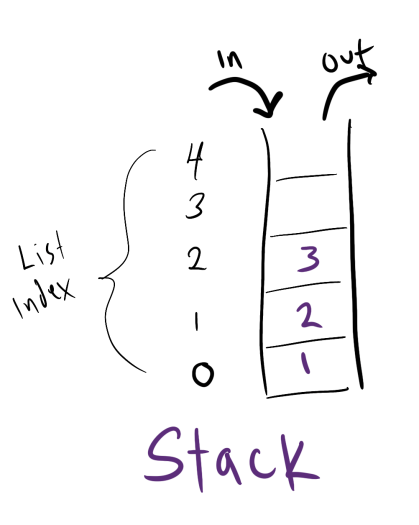
You can implement a stack by using a list, and removing elements with methods like remove, removeAt, or (might I suggest) removeLast.
- previous: Reading elements pt 1: first, last
